
6-week tournament?
What a coincidence.
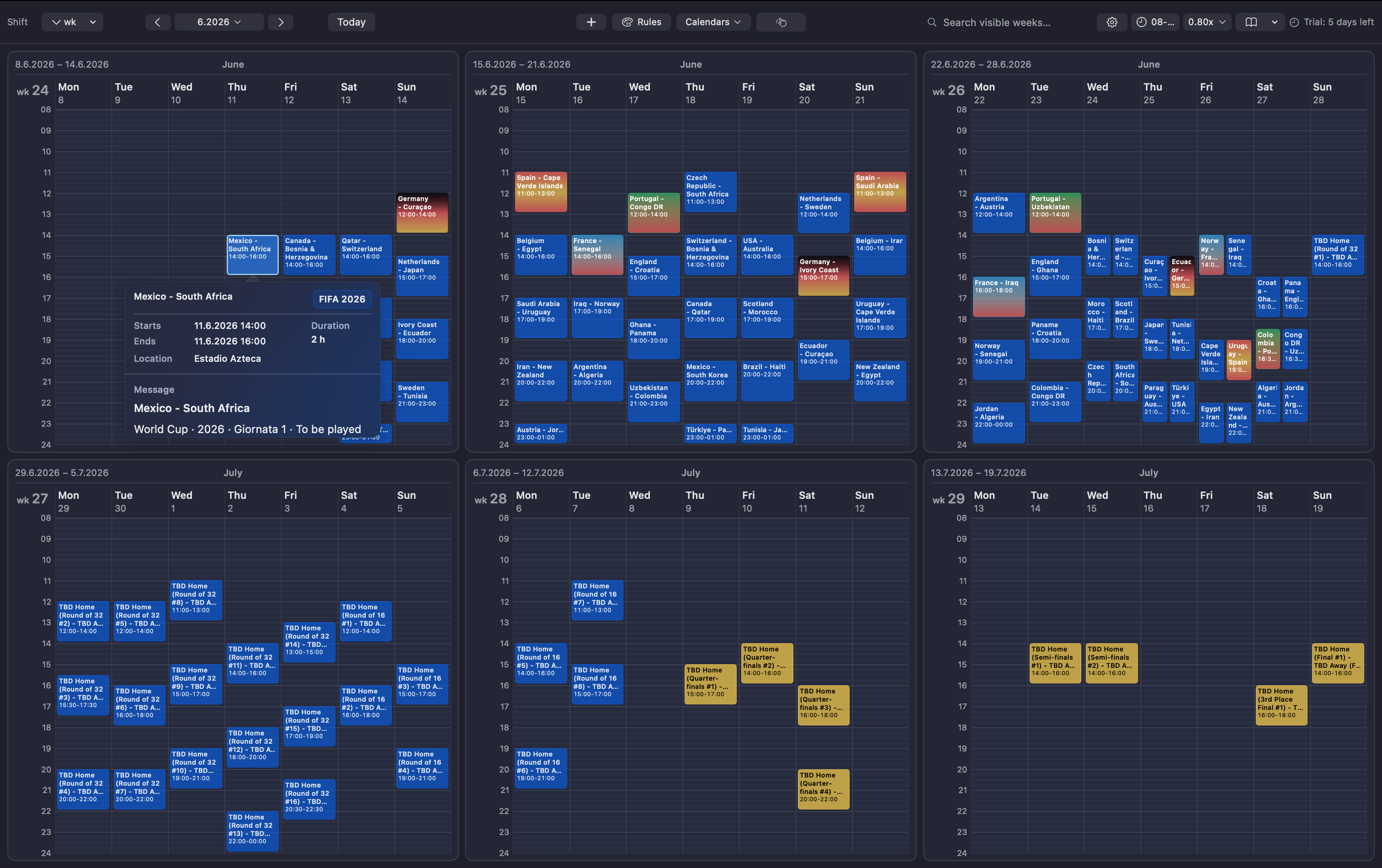

Get the FIFA World Cup 2026 Schedule on Your Mac
The entire tournament at a glance — 6 weeks, 104 matches, one screen.
Step 1: Download the FIFA 2026 Match Schedule
Head to matchesio.com/competition/world-cup and download the World Cup 2026 calendar as an ICS file. You can download the full tournament schedule or pick only the teams you want to follow.
What is an ICS file? ICS (iCalendar) is a universal calendar format supported by Apple Calendar, Google Calendar, Outlook, and virtually every calendar app. It packages events — with dates, times, locations, and descriptions — into a single file you can import anywhere.
Step 2: Import the Schedule into Apple Calendar
Open the downloaded .ics file — it will open in Apple Calendar automatically. Choose which calendar account to add the events to (iCloud, Google, or any account you have set up). We recommend creating a dedicated calendar called "FIFA 2026" first, so all the matches stay neatly organized and easy to show or hide.
To create a new calendar: open Apple Calendar → File → New Calendar → name it FIFA 2026.
Step 3: Set Up the Calendar in MultiWeek
Open MultiWeek and click Calendars in the toolbar. You'll see all your Apple Calendar accounts and calendars listed in settings. Make sure your new FIFA 2026 calendar are checked and the go to Calendars menu on the main screen and select it. That's it — all 104 matches will appear across your multi-week view instantly.
Pro tip: Set MultiWeek to show 6 weeks and the entire tournament fits on a single screen — from the opening match on June 11 to the final on July 19.
Step 4: Add Color Rules to Match Your Team's Flag
Make your team's matches pop with national flag colors. Click Rules in the toolbar and create color rules that match keywords in event titles.
For example, if you're following Portugal 🇵🇹:
Rule 1: title contains "Portugal" → 🟢 Green
Rule 2: title contains "Portugal" → 🔴 Red
You can set up multiple teams with different color schemes. Group stage matches, knockout rounds — everything is color-coded at a glance so you instantly spot the games that matter to you.
Step 5: Search for Any Match Instantly
Need to find a specific game? Use the Search field in the top-right corner of MultiWeek. Type a team name — like "France" or "USa" — and MultiWeek will highlight matching events across all visible weeks. Jump to any match in seconds, no scrolling required.
Your Work Week and the World Cup — Side by Side
Here's where MultiWeek truly shines. Your regular work calendar and the games schedule live together on the same screen. See at a glance which matches fall during lunch, which ones you can catch after work, and which days you might want to block off early.
No app switching. No guessing. Just your real schedule and the beautiful game — together in one view.
A 6-week tournament deserves a 6-week calendar.